SMS consent is a visible, unchecked checkbox.
Elizabeth AI Receptionist is an AI phone receptionist used by medical practices. This page documents exactly how each subscriber opts in. Every consent checkbox loads unchecked — never pre-selected, never hidden. Providing a phone number is not consent by itself. Consent is never required to receive care, book a demo, or buy a plan.
1. Patient opt-in — practice check-in kiosk
This is how patients who receive appointment reminders and refill updates opt in. On the practice’s check-in tablet a patient taps their name, confirms their date of birth, and on the confirmation screen is shown an unchecked SMS consent checkbox. The number used is the mobile number already on file in their chart; the kiosk does not ask them to retype it. Ticking the box is optional and check-in completes either way.
Exact checkbox copy (the practice name is substituted at runtime):
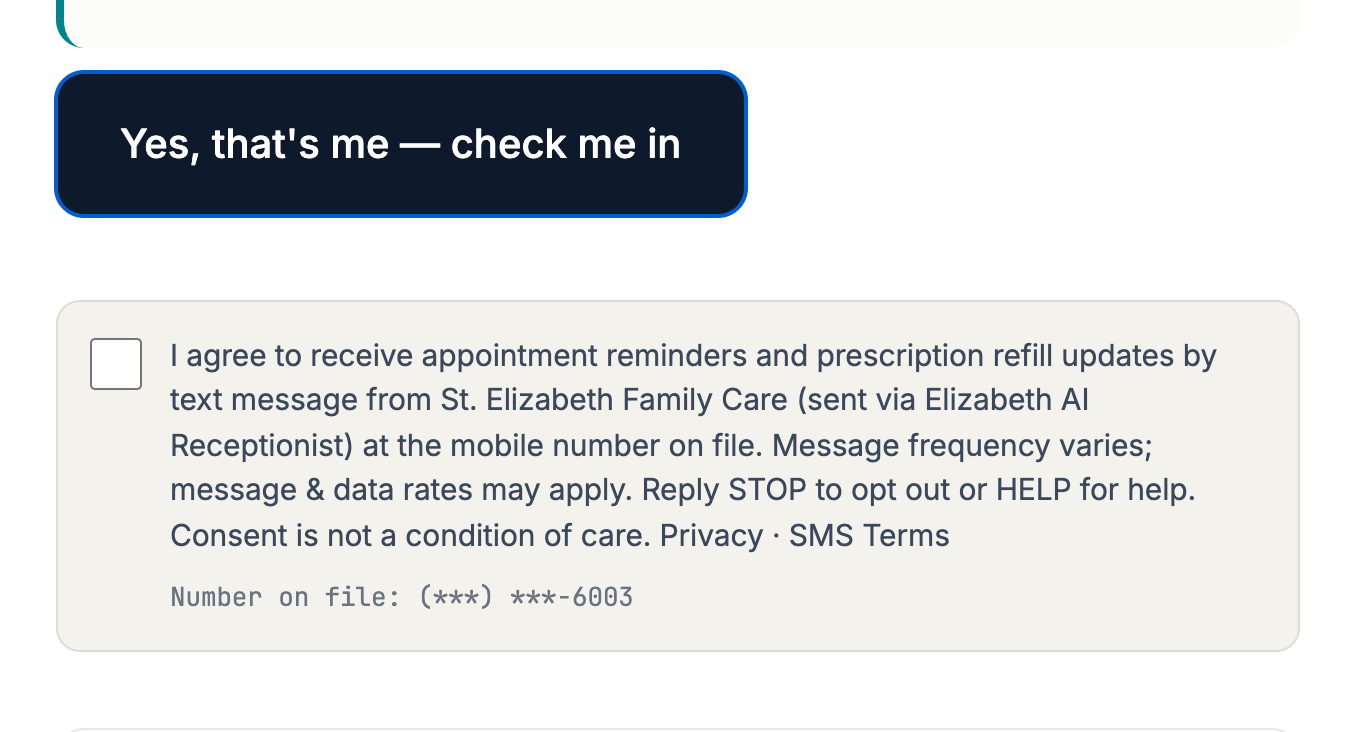
Screenshot of the live check-in kiosk confirmation screen. The box is not checked.
Live kiosk: https://elizabethaireceptionist.com/checkin — the consent screen appears after a patient selects their appointment, so it is reachable only during an active check-in.
2. Practice staff opt-in — demo request form
Live page: https://elizabethaireceptionist.com/book-demo (public, no login). The first screen collects Full name, Work email and a required Phone field, with the unchecked consent checkbox directly beneath. Adjacent text reads “Optional — leave it unchecked and you can still book.”
Exact checkbox copy:

Screenshot of the live /book-demo checkbox. It is not checked.
Program terms (STOP / HELP)
- Patients receive appointment reminders and prescription refill updates from their practice, sent via Elizabeth AI Receptionist. Practice staff who request a demo receive messages about that demo.
- Message frequency varies. Message and data rates may apply.
- Reply STOP to opt out. Reply HELP for help, or email [email protected].
- Consent is not a condition of care or of purchase.
- We do not use keyword, paper, purchased, or imported-list opt-in for this campaign.
- A prior STOP always outranks a later checkbox: a number that has opted out is never re-subscribed by a kiosk tap.
- Privacy Policy (mobile opt-in data and phone numbers are not shared or sold to third parties or affiliates for marketing): https://elizabethaireceptionist.com/privacy
- SMS Terms: https://elizabethaireceptionist.com/terms
Last updated September 1, 2026.